Blogs
June 12, 2026

Thomas Alflen
Oddity.ai
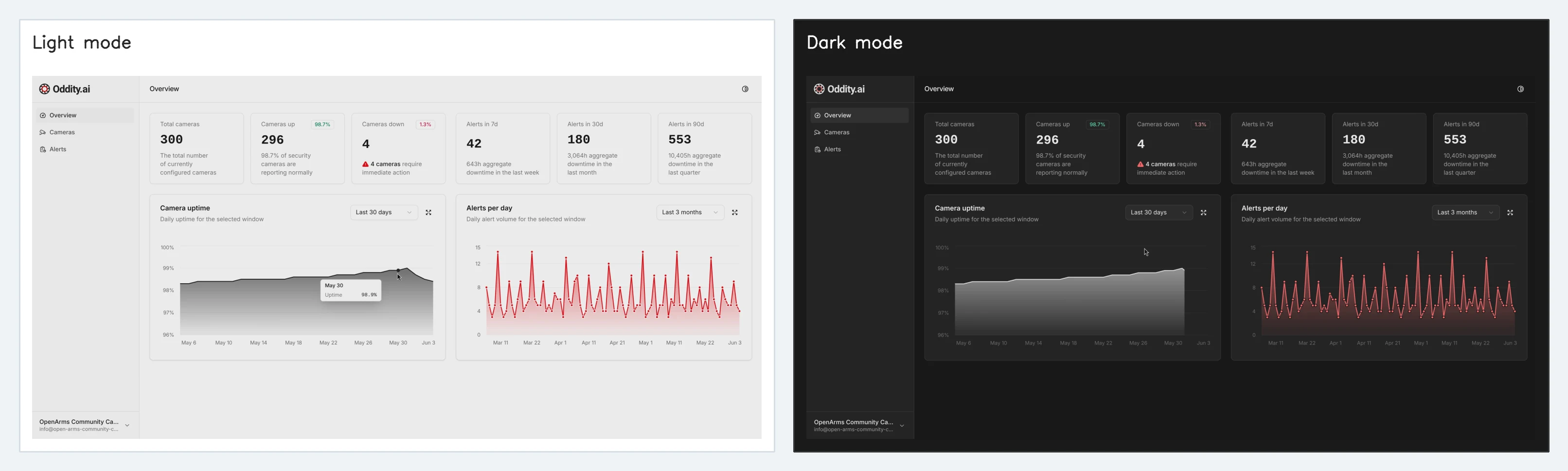
The new Oddity.ai dashboard gives leadership one place to see what needs attention now, what changed recently, and where follow-up may be needed next.
Real-time alerts are most useful when teams can also zoom out. A surfaced moment helps staff respond, but leadership and operations still need a clear view across cameras, locations, and patterns over time.
That is what our new dashboard is designed to do. It brings live camera health, alert activity, and trend visibility into one operational view so teams can move faster without adding another manual reporting process.
Teams need clarity in the moment, not after the fact. The overview brings live camera status, recent alert counts, and trend data into one place so leadership can quickly understand whether anything needs attention now.
It is also available in both light mode and dark mode. The goal is not to add another screen that needs constant watching. The goal is to make visibility faster and easier when people do need answers.
Light mode
Dark mode
Leadership often needs to know more than whether an alert happened. They need to know whether activity is rising, whether one period looks different from another, and where follow-up may be needed first.
The dashboard makes that easier by showing alert volume by timeframe. Teams can move between short and longer windows, spot concentrated activity, and focus their review where it matters most.
Real-time safety alerts depend on healthy camera infrastructure. If a camera is down, misconfigured, or unstable, that is not just an IT issue. It is an operational blind spot.
The new dashboard gives teams immediate awareness of camera uptime and downtime so they can see which cameras are live, which ones are down, and whether something needs action now.
The dashboard does not just show what happened today. It helps teams see patterns over time: recurring alert spikes, uptime dips, and whether specific sites or cameras need more attention.
That supports a shift from reactive crisis management to proactive oversight. Teams can review faster, direct follow-up more precisely, and use the data to improve operations before smaller issues become larger ones.
Overview trends
Camera-level follow-up
Oddity.ai has always been about helping teams respond faster in high-risk moments. The dashboard extends that same principle beyond the alert itself. It helps leadership and operations move from isolated events to clearer oversight.
That means fewer blind spots, faster incident oversight, and better visibility into whether the system is healthy and where support may be needed next.
We can show how it fits with real-time Oddity alerts and your existing camera environment.